.svg)
.svg)
Application Change Management
How automation is easing IT’s application change pressure
Every enterprise IT team is living through the same quiet emergency. It rarely makes the headlines the way a breach or an outage does, but it is grinding people down all the same: the relentless, compounding pressure of application change.
Windows 10 has reached end of support. Windows 11 migrations are overdue. SCCM estates are being pulled apart and rebuilt in Intune. Virtual desktops are moving to Windows 365 and Azure Virtual Desktop. And underneath all of it, the ordinary churn never stops — a security patch here, a vendor update there, a new line-of-business app that has to be packaged, tested, and delivered without breaking the twelve things that depend on it. Each change is manageable on its own. Together, they have become an avalanche that manual processes were never built to survive.
The change never stops — and it’s accelerating
For years, application change was something IT could schedule around. Migrations were multi-year programs. Patch cycles were monthly. There was time to package an application by hand, hand it to a tester, wait for sign-off, and push it out during a maintenance window.
That world is gone. Three things have collapsed the timelines at once. Operating system deadlines are no longer negotiable, forcing thousands of applications through validation on a fixed calendar. Cloud and endpoint management platforms are changing faster than teams can absorb, so the target keeps moving. And the sheer size of the modern application estate — often thousands of packages across a single organization — means that even a routine change touches more users, more devices, and more dependencies than ever before.
The result is a backlog problem that looks a lot like the one facing security teams. Work arrives faster than it can be cleared. Every deferred migration, every untested patch, every “we’ll get to that app later” becomes technical debt with a due date. And the people carrying that debt are exhausted.
Why traditional application change breaks down
Traditional packaging and testing were built on an assumption that no longer holds: that you can afford to do the work by hand, one application at a time.
The problem is not that IT teams are slow. It’s that manual change doesn’t scale to the volume and velocity now demanded of it. Packaging an application manually, standing up a test environment, clicking through a smoke test, and waiting for user acceptance testing might take days, weeks or sometimes even months per app. Multiply that across an estate and a hard migration deadline, and the maths simply doesn’t work.
There is a deeper problem too, and it’s one of visibility. Most IT teams can see the change they’re about to make. Very few can see its consequences. Will this patch destabilize a critical application? Will this migration break a dependency three layers down? Will this update behave differently on a virtual desktop than it did on a physical one? Without a way to answer those questions before production, every deployment is a calculated gamble — and the calculation is mostly guesswork.
What automation actually changes
The organizations getting ahead of this are the ones that have stopped treating application change as a manual craft and started treating it as an automated, evidence-based discipline. That shift rests on three principles.
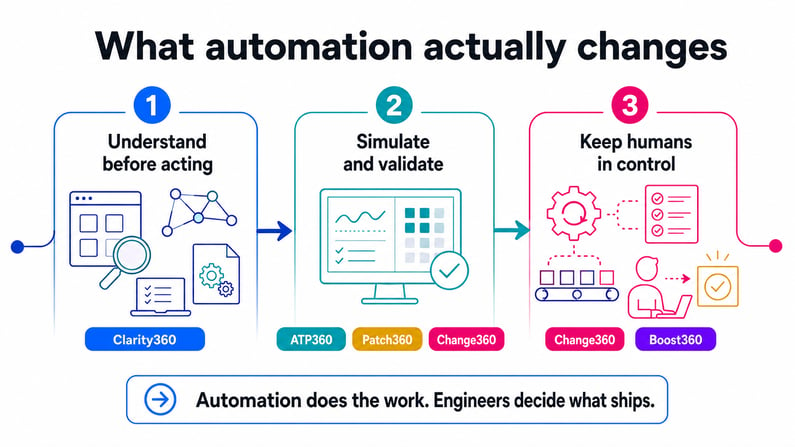
The first is understanding before acting. Before anything is packaged or moved, the estate has to be mapped — applications, endpoints, dependencies, and configurations — so that the blast radius of a change is known rather than assumed. This is where Clarity360 earns its place, giving teams continuous visibility and reporting across their Intune estate so they can see not just what’s deployed, but where the risk actually lives. You can’t automate safely what you can’t see.
The second is simulation and validation, not hope. Instead of pushing a change into production and waiting for the help desk to light up, automation lets teams model how a change will behave first. This is the job of ATP360, which installs, launches, and tests applications automatically against real-world conditions, so compatibility problems surface in a controlled environment — not on an executive’s laptop. What used to take weeks of manual UAT can be compressed into hours, and an entire application estate can be validated in as little as 48 hours. The same discipline applies to application and Operating System updates: Patch360 and Change360 managed and validates these updates against your environment before they ship, so you never have to choose between staying secure and staying stable.
The third is automation with a human in the loop. The goal is not to remove people from the decision — it’s to remove them from the drudgery. Change360 automates the heavy lifting of migration — from SCCM to Intune, Windows 10 to Windows 11, or legacy VDI to Windows 365 and Azure Virtual Desktop — while Boost360 extends what Intune can do out of the box. Across all of it, the automation does the packaging, testing, and risk analysis; engineers make the call on what ships. Every deployment is backed by evidence and an audit trail, which matters enormously in regulated sectors where “we tested it” has to mean something you can prove.
Your team can’t stop change. It can stop carrying all of it. See How →
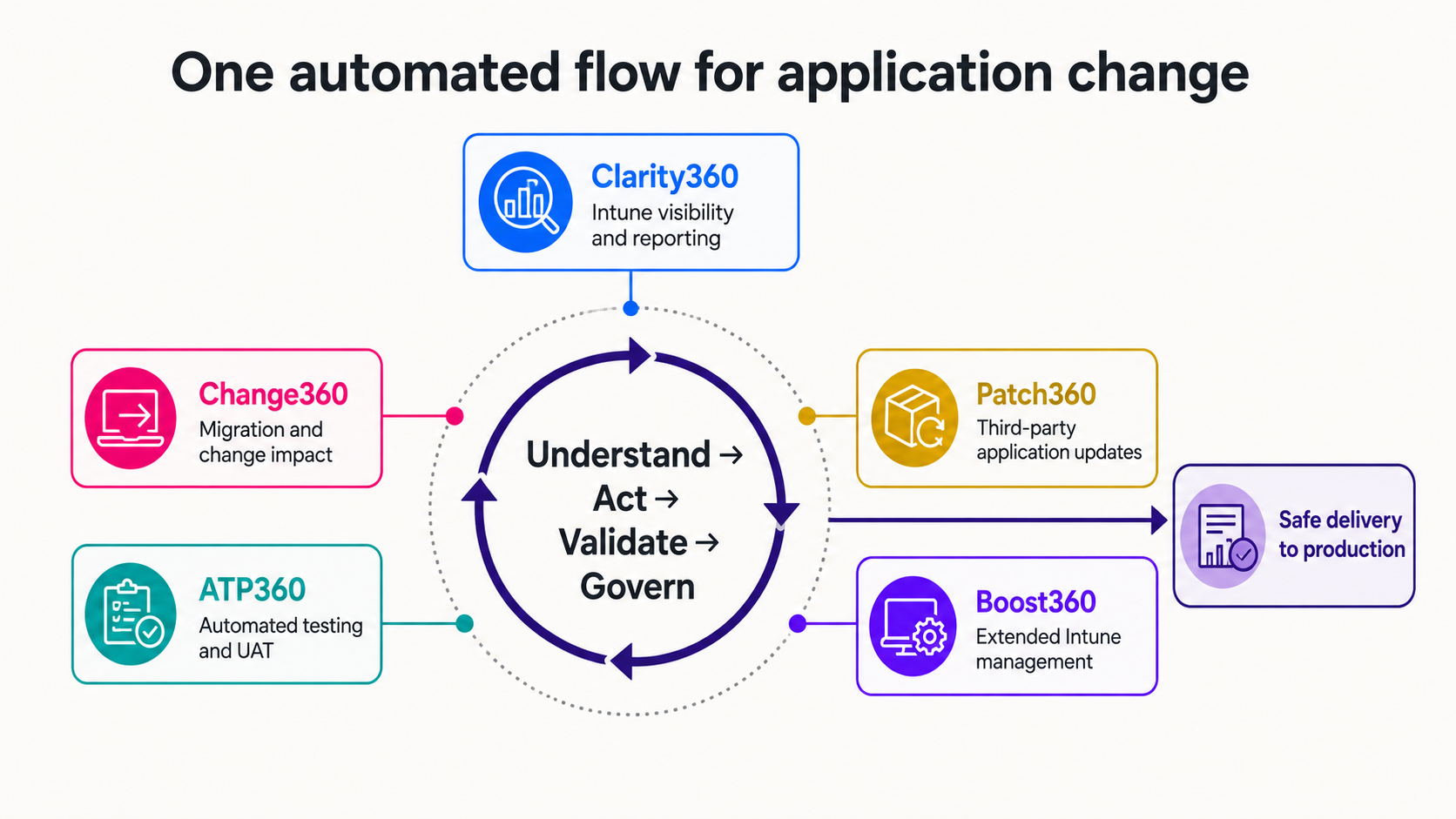
This is the model behind WorkspaceDNA. Rather than a bag of point tools, it treats the full lifecycle of application change as one automated flow — understanding what needs to change, doing the work, and validating safe delivery into production — through five purpose-built engines: Change360 for understanding the impact of migration and change against your environment, Patch360 for third party application management, ATP360 for AI powered automated testing and UAT, Boost360 for automated Intune actions, and Clarity360 for Intune visibility and reporting. In one enterprise migration, this approach validated the estate and achieved 97% application compatibility ahead of rollout, turning a project that would normally be measured in months of manual effort into a matter of days.
The human cost is the real return
It’s tempting to frame all of this as a productivity story, and the efficiency gains are real. But the more important return is human. When automation absorbs the repetitive work of packaging, testing, and validating, it doesn’t just move faster — it takes the constant low-grade dread out of every deployment. Engineers stop spending their evenings babysitting rollouts and their mornings firefighting the ones that went wrong. The work that’s left is the work that actually uses their expertise.
That is the quiet promise underneath the migrations and the patch cycles. Automation isn’t about doing more change for its own sake. It’s about making change survivable — for the estate, and for the people responsible for it.
So the question worth asking isn’t whether your team can keep up with the next migration or the next patch. It’s whether the process itself is built to absorb the impact. If every change still depends on manual effort and crossed fingers, the pressure will keep building. If it’s built on understanding, simulation, and evidence, it becomes something your team can actually get ahead of.