.svg)

Ring 0 shouldn’t be your colleagues
How WorkspaceDNA now tests every app in your own Intune environment, before any user gets it.
Every IT team knows this story. An app passes testing. It goes to Intune. It reaches the first group of users. Then the tickets start.
Why? Because the test machine wasn’t like the real ones. It didn’t have your security settings, your policies, or the apps your users already have.
We’ve been fixing that in three steps.
Catch app issues before your users do.

Step 1: Test the app before it goes to Intune
When WorkspaceDNA packages and discovers an app, it can test it on a Windows 365 Cloud PC first. Does it install? Does it open? Does it uninstall cleanly?
For updates, the Cloud PC can keep its old apps and versions. So we install the new version on top of the old one, just like on your users’ devices. That’s where most patches break.
This step is optional. It tells you the package works. It doesn’t tell you if it will work in your environment.
Step 2: Test the app inside Intune, in Ring 0
This is the new part.
Your Intune environment has its own rules. Security policies. Microsoft Defender. Attack Surface Reduction (ASR) rules that block risky behavior. App Control. No admin rights for users. A proxy. An app can pass every lab test and still fail on the first real device, because one of those rules blocks it.
Today, the first people to find out are usually your IT team or a few early adopters. They’re your Ring 0, whether they signed up for it or not.
With WorkspaceDNA, Ring 0 is a machine instead of a person. It’s a Windows 365 Cloud PC that’s part of your Intune setup and gets all your policies.
Here’s how it works:
-
WorkspaceDNA packages and discovers the app. You can test it on a Cloud PC first if you want to.
-
The app is sent to Intune.
-
Intune installs it on the Ring 0 Cloud PC, the same way it would on any other device.
-
WorkspaceDNA checks it. Did it install? Does it open? Did your security settings block anything? Does it work next to the other apps?
-
If it passes, it moves on to Ring 1 and then the rest of your devices. If it fails, it stops there and you see what went wrong.
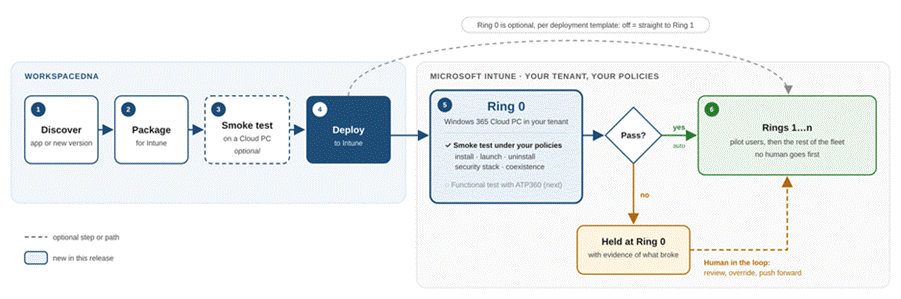
From package to all your devices, with Ring 0 going first.
No user gets an app until a machine has tried it first.
You stay in control
-
Ring 0 is optional. You turn it on or off in each deployment template. Use it for the apps that matter most, like browsers, VPN clients and business apps. Skip it for small, low-risk tools.
-
Apps that pass move on by themselves. Nobody has to click approve.
-
You can always override. If an app fails but you know why (say it’s a harmless pop-up, or an urgent security fix you can’t hold back), your team can push it forward anyway.
Step 3: Test what users actually do
A smoke test checks that an app installs and opens. It doesn’t check that finance can still run their month-end report, or that the Excel add-in still loads.
That’s coming next. Ring 0 will run functional tests with ATP360, our AI-driven testing. AI agents will use the app the way a person would: open files, fill in forms, move between apps. Then Ring 0 won’t just tell you the app works. It will tell you your users can still do their jobs.
When Ring 0 helps most
-
Urgent security patches. Attackers now often exploit a flaw before a patch even exists (Mandiant M-Trends 2026). You can’t wait a week for user feedback. Ring 0 gives you an answer in hours.
-
Automatic patching. With the WorkspaceDNA Patch Catalog, new versions arrive soon after vendors release them. Add a Ring 0 template and each one gets tested before anyone receives it.
-
Strict security setups. Healthcare, finance and government run the tightest policies, so a basic test lab tells them the least. Ring 0 tests under the real rules and leaves a record for audits and change boards.
-
Moving from SCCM to Intune. “It worked in SCCM” doesn’t mean it will work in Intune. Test each app before you switch over, not after.
-
Small teams and MSPs. No spare test devices? No willing volunteers? Ring 0 is your volunteer. MSPs can run one for each customer.
Where we are
|
Step |
What it checks |
Status |
|
1. Test before Intune |
Does the package, and the update, work? |
Available (optional) |
|
2. Ring 0 smoke test |
Does it work in my Intune environment? |
New |
|
3. Ring 0 functional test |
Can my users still do their work? |
Coming next |
Your pilot users still matter. But they should be the ones confirming an update is fine, not the ones finding out it’s broken.
Ring 0 is here. Book a WorkspaceDNA demo and watch an app go from package to Ring 0 to Ring 1, with no person going first.